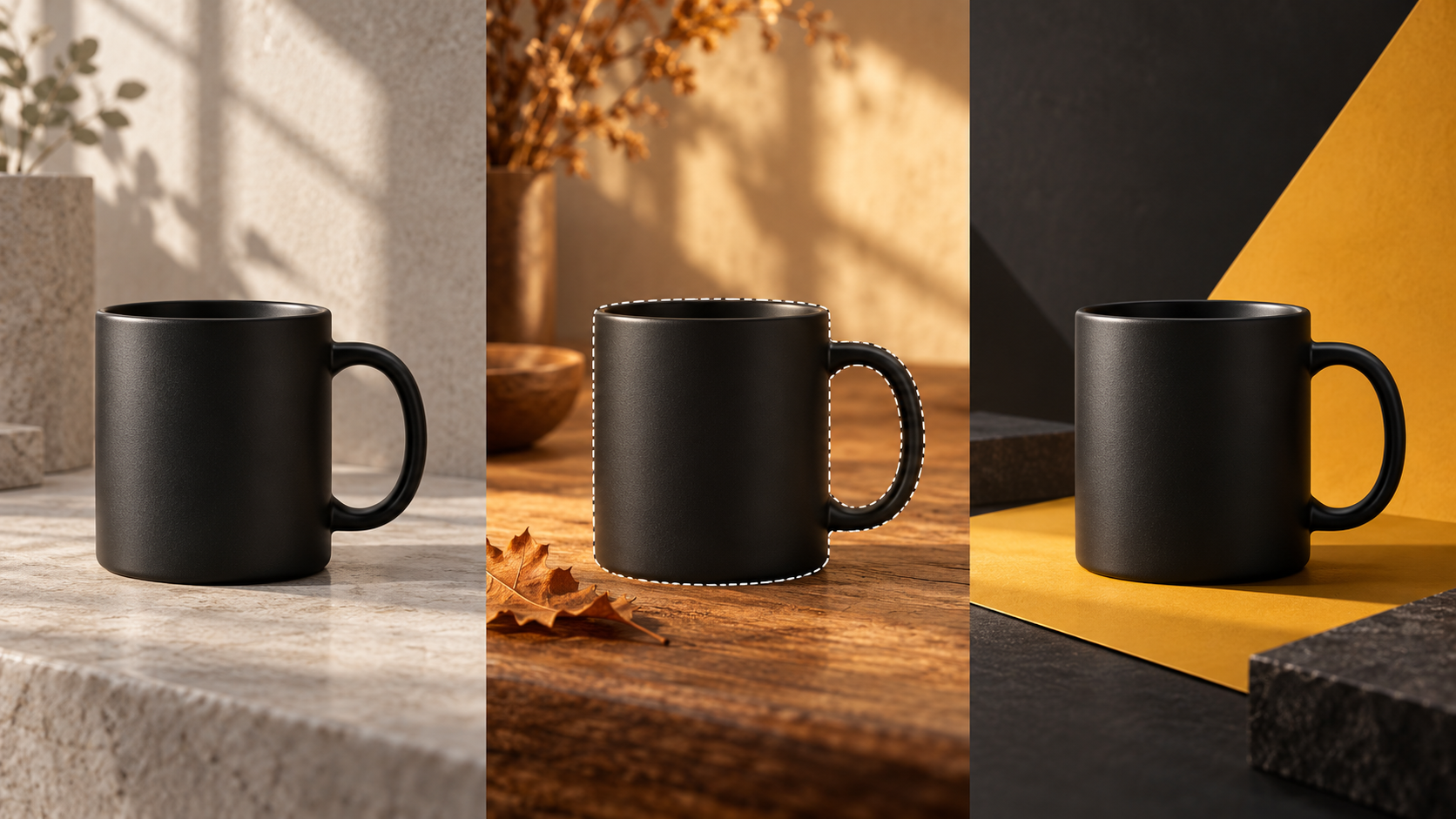
A small business can have a perfectly good product photo and still need a different setting for the next promotion. A clean studio shot might work for the website, while a seasonal social post needs a warmer background and room for a headline.
Recent AI image-editing improvements make that worth testing. The important part is keeping the actual product accurate.
What changed
On September 8, 2026, OpenAI introduced ChatGPT Images 2.5. The company says it improves how reference subjects carry through an edit, follows targeted instructions more reliably, and keeps earlier changes more consistent across several rounds of editing. It also added comments directly on images for more focused changes. Those are vendor claims, not a guarantee that every detail will survive. OpenAI’s release announcement
For photography, design, and small-business marketing, the useful possibility is straightforward: start with something real, then explore a new setting around it. That gives the original photograph a continuing role in the work.
Start with a photo you can trust
Imagine a local shop promoting a ceramic mug. Begin with a sharp photograph of the mug it actually sells, with enough light to show its color, finish, and handle. Keep the original file untouched.
Decide what can change before uploading anything. The background, surrounding props, and empty space for copy might be flexible. The mug’s shape, capacity, markings, and color are not.
Use an image you have permission to upload and edit. For client work, confirm that permission before putting an unreleased product or customer photograph into an AI service.
Make one controlled edit
Upload the photograph and describe a specific change. ChatGPT supports edits through a written request or a selected area. Its current help page also warns that selections are not always precise and changes can extend outside them. Image-editing guidance
For the mug, a starting prompt could be:
“Change only the background to a simple autumn tabletop with warm natural light. Preserve the mug’s exact shape, proportions, handle, surface finish, and color. Do not add a logo or alter any existing markings. Leave clear space above it for a headline.”
Treat that as a brief to check, not a lock on the product.
Ask for one adjustment at a time. Review the background first, then the composition. Save useful versions rather than assuming every new attempt will improve the last one.
If the tool keeps changing the mug, stop regenerating it. Generate a background separately and place a cutout from the original photograph over it in your usual image editor. You will still need to match the scale, lighting, edges, and contact shadow.
Keep the final design editable
Add the real logo, price, offer, and headline in your design software. Keeping those elements separate makes corrections easier and avoids relying on generated lettering for essential business details.
Build the formats you actually need: perhaps a square post and a vertical story. Check each crop rather than assuming one composition will fit everywhere. Leave space around the product and make sure the offer is readable on a phone.
Before exporting, compare the result with the original at full size. Look closely at labels, handles, seams, reflections, and surface texture. Does the photo still show the item someone will receive? Have invented props made it look as though the purchase includes something it does not?
A convincing image can still be an inaccurate advertisement. If you cannot correct it confidently, use the original photograph.
Another use case for event services
A photographer or DJ could turn an authorized behind-the-scenes photo into a graphic promoting bookings. Keep the real photo intact in a clearly framed panel, then generate a separate decorative background around the layout.
Try a brief such as: “Create a subtle black-and-gold abstract background for an event-services promotion. Leave open space for a photograph and headline. No people, venue, logos, or text.”
Add the actual service, location, booking details, and contact information as editable text in your design software. Confirm availability before advertising it. Build a story version with a readable call to action and a wider version for an email header.
Do not invent a larger crowd, a venue the business never worked at, or a customer endorsement. The photograph shows real work; the generated background supplies the design treatment.
What it costs
As checked November 2, 2026, ChatGPT’s Free tier includes image creation, with separate usage limits for images and uploads. It is a reasonable place to try a small, non-sensitive test before buying anything. Free-tier details
ChatGPT Plus is listed at US$20 per month, billed monthly. API usage is separate and billed independently. Check your account’s current access and limits before promising a client a production schedule. Plus pricing and access
The subscription is only part of the cost. Include the time spent selecting references, rejecting attempts, correcting details, and preparing the final layouts.
Permissions and honest presentation
OpenAI’s individual-use terms say users retain their input rights and own the output as between themselves and OpenAI, to the extent permitted by law. They also require the necessary rights to uploaded material and warn that outputs may not be unique. That is not a substitute for permission to use someone’s photograph, branding, or likeness. Terms of Use
Review data settings before uploading client material. Personal-account users can manage model-training preferences under Data controls; those controls do not replace the client’s confidentiality requirements. Data controls
Be clear with the client about what was generated. If the scene could reasonably be mistaken for a real location or shoot, add an appropriate disclosure. For event or film coverage, keep invented settings out of photographs presented as a record of what happened.
Try it on one useful asset
Choose one product or service, one approved photograph, and one campaign idea. Set a time limit. Compare the finished result with a straightforward layout using the original image.
If the edited version communicates the offer clearly and keeps the subject accurate, you have a useful option. If it adds correction work without improving the design, the original photo already did its job.
Source notes
All sources are official primary sources, checked November 1, 2026, Pacific time. Pricing, Free-tier access and limits, and image-selection limitations were rechecked November 2, 2026, Pacific time.
- OpenAI, Introducing ChatGPT Images 2.5, September 8, 2026.
- OpenAI Help Center, Images in ChatGPT, current availability, editing workflow, and selection limitations.
- OpenAI Help Center, ChatGPT Free Tier FAQ, current image and upload access and limits.
- OpenAI Help Center, What is ChatGPT Plus, current US$20 monthly price and separate API billing.
- OpenAI, Terms of Use, effective January 1, 2026, input permissions and output ownership.
- OpenAI Help Center, Data controls in ChatGPT, current personal-account training controls.